Landing pages are also often called "Squeeze" or "Lead Capture" pages. They serve to force a consumer to provide their contact information before they can access online information about a listing or an offer. The objective is to turn web visitors arriving to your site or reading your advertisement that you've placed on a portal (for example Facebook), into leads. A good landing page quickly garners a prospect's attention with a Call to Action (CTA) that speaks to their interest and need. Good CTA messages are clear, concise, easy to understand and jargon-free.
Depending on the listing type (Coming soon, Just Listed,
Open House, Price Change...) you will use the appropriate RealBird landing page.
Here is where you find the landing pages for a particular listing in your RealBird account:
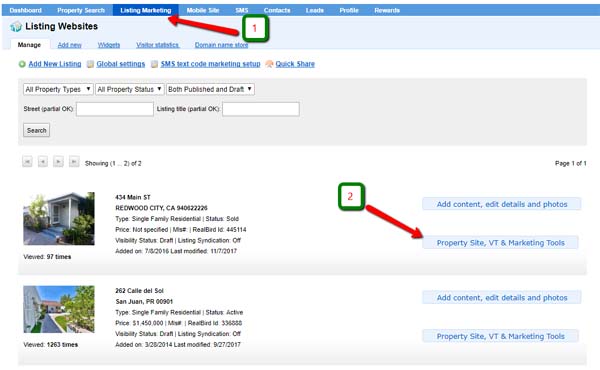
1. On the blue navigation bar click on "Listing Marketing"
2. Find the listing that you want to market and click on its "Property Site, VT & Marketing Tools" button:
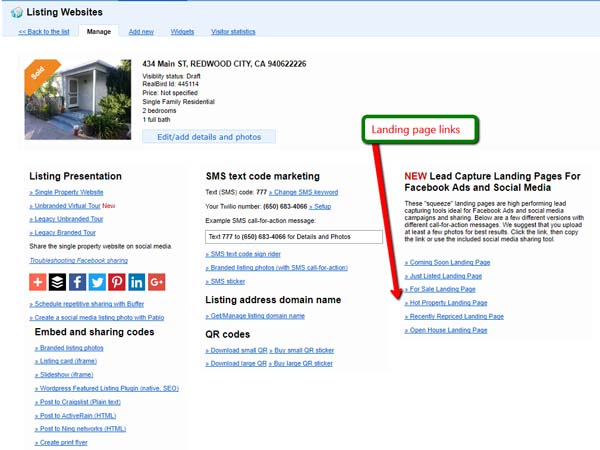
The Squeeze pages will located as shown below; select the one appropriate for the task:
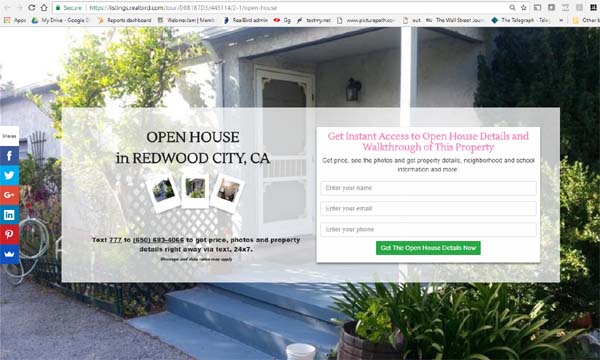
For example, the Open Home landing page will show like this:
NOTE: You will use the URL from the landing page's browser bar to post the page to various sites that you choose for your marketing.
LEAD CAPTURE PROCESS:
The
lead capture process has two steps:
- Post the appropriate page link on social media, or send it via email, or purchase online ads etc. with an enticing call-for action (see an example below), with the goal of attracting a potential client to click on the landing page
- Once the consumer clicks on that link / image the landing
page will open, presenting an additional call for action text which asks visitors to enter their name, email or phone number and to submit the form
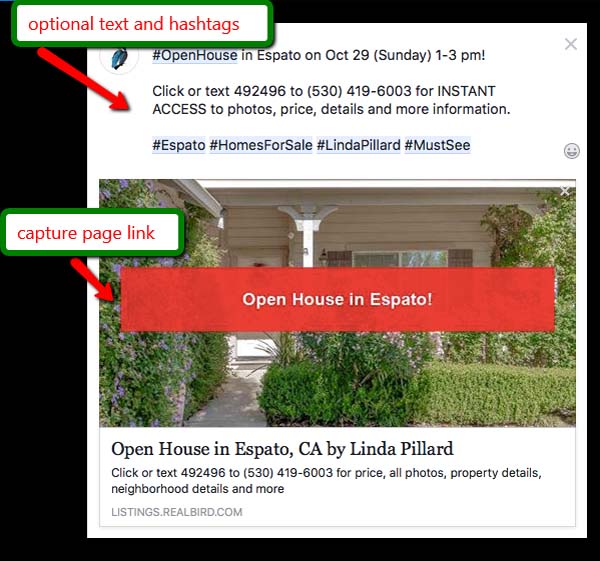
The figure below illustrates how posting a lead capture page link for an Open House onto your Facebook timeline will look. Note the text and hashtags that you can optionally add to such a post to make it more effective:
Finally, once you posted the page link onto your Facebook timeline you can also purchase Facebook targeted advertising for your posts (Boost Post). Here is a tutorial for that: https://www.facebook.com/business/a/boost-a-post

 Uploading ....